Creating Parameters:
In the script View, select the string and right click on it. Then, select the replace with parameter.
Type the Name of the parameter in the new opened small window / popup. You can also select it from drop down. Then, select parameter type from the parameter type list. You may select any of the available types: Date/Time, file, Group Name, Random number, Unique number, User defined function, or Vuser ID (whichever is appropriate). Next, you may select next row as:
At last, you will need to update values on:
Each iteration - It instructs the Vuser to use a new value for each iteration
Each occurrence - It instructs the Vuser to use a new value for each occurrence of the parameter
Once - It instructs the Vuser to update the value of the parameter only once during the execution.Data wizard is a great option for Parametrization in LoadRunner.
Objectives of parameterization:
· One of the main objective of parametrization is to simulate real user behavior while running the test and we also use this to solve below problem
· Solve Date constraints that may occur during playback
1. Eg: When Second Virtual User accessing the Application user may fail because of the 2/14/99 was yesterday!]
· Solve data caching that may occur during playback
1. Eg: When Second Virtual User accessing the Application, user will get data from Cache
· Solve unique constraints that may occur during playback
Eg: Order number 1234 is already here
· Solve data dependency that may occur during playback
· Emulate real user activity
Exercise the server (Some times when we are searching with same keyword, the request will not go to database and it will get the data from the webserver cache and it will not exercise the server. Parameterization will solve this problem)
How to create Parameters:
· Right click on the value and select “Replace with parameter” where we need to execute with different set of values.

· On the new window opened just give the Parameter name as user defined variable and Parmeter typeàselect any one from the drop down and Original Value will be default value and click on properties

· After clicking on properties new window will be opened then click on Edit with notepad button and enter some list of values.
Note: After entering values in notepad keep the cursor in new line and save the notepad and close it.

· After entering the different set of values we have to customize the parameter properties to execute the script as user’s perspective.
1. Select Columnà By Number
àBy Name
These values are used when we have multiple columns in the same table with the same parameter type. We can select for each parameter by number as column number or by name as column name.

2. File Formatà Column Delimiter

If you select Select Next Row as Sequential and Update Value On as Each iteration then the users will execute the data sequentially for each iteration.
Click on close button and press CTRL+L buttons then parameter properties window will open with all parameters in left side and right side parameters data window.
If you click on Simulate Parameter button and then enter the iterations in check box and then click on simulate button then we will get the user behavior when the time of execution how the parameters will pass to the vusers.

If you select Update value on as Each Occurrence we can not simulate the parameter.
If you select Update value on as Once then the vuser will take only one set of data for all vusers. For ex: In the above snapshot we will get jojo and bean for each and every vuser we execute.
If you select Select Next Row as Random and Update value on as Each iteration then the user will pick random data for each and every iteration. At that we have to select for one parameter these values and select Same line as that parameter name for remaining parameters
For Ex: If we select RandomàEach iteration for Username then we have to select Same line as username for password.
If you select Select Next Row as Unique and Update value on as Each Iteration or Each Occurrence then automatically When Out of Values and Allocate Vuser values in the controller will be enabled.
When Out Of Valuesà Abort Vuser
Allocate Vuser values in the controller(Radio Buttons):
Automatically allocate block size
Allocate ______ values for each vuser

If you have values less than vusers at that time we have to select UniqueàEach IterationàAbort Vuser then what ever the users extra are aborted from the execution.
OR
We can select UniqueàEach IterationàContinue in a cyclic manner
OR
We can select UniqueàEach IterationàContinue with last value
And we can select any of the two radio buttons for Allocate vuser values in the controller in the above three different cases
If you select Unique Each Occurrence only
Allocate ______ values for each vuser will be enabled for all the three cases
And you can click on Simulate Parameter button for each and every different options customized to view how the vuser behavior.
If you select Uniqueà Once all the vusers will execute with one set of data.
Once parameterization is done click on close button. Test the data execution procedure in the form of iterations in VUGen.
In the script View, select the string and right click on it. Then, select the replace with parameter.
Type the Name of the parameter in the new opened small window / popup. You can also select it from drop down. Then, select parameter type from the parameter type list. You may select any of the available types: Date/Time, file, Group Name, Random number, Unique number, User defined function, or Vuser ID (whichever is appropriate). Next, you may select next row as:
- Sequential
- Random
- Unique
- Same line as
At last, you will need to update values on:
Each iteration - It instructs the Vuser to use a new value for each iteration
Each occurrence - It instructs the Vuser to use a new value for each occurrence of the parameter
Once - It instructs the Vuser to update the value of the parameter only once during the execution.Data wizard is a great option for Parametrization in LoadRunner.
Objectives of parameterization:
· One of the main objective of parametrization is to simulate real user behavior while running the test and we also use this to solve below problem
· Solve Date constraints that may occur during playback
1. Eg: When Second Virtual User accessing the Application user may fail because of the 2/14/99 was yesterday!]
· Solve data caching that may occur during playback
1. Eg: When Second Virtual User accessing the Application, user will get data from Cache
· Solve unique constraints that may occur during playback
Eg: Order number 1234 is already here
· Solve data dependency that may occur during playback
· Emulate real user activity
Exercise the server (Some times when we are searching with same keyword, the request will not go to database and it will get the data from the webserver cache and it will not exercise the server. Parameterization will solve this problem)
How to create Parameters:
· Right click on the value and select “Replace with parameter” where we need to execute with different set of values.
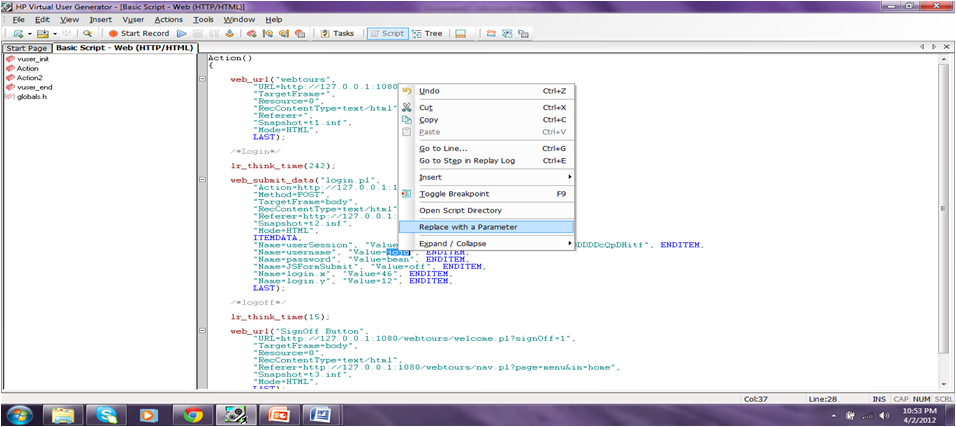
· On the new window opened just give the Parameter name as user defined variable and Parmeter typeàselect any one from the drop down and Original Value will be default value and click on properties

· After clicking on properties new window will be opened then click on Edit with notepad button and enter some list of values.
Note: After entering values in notepad keep the cursor in new line and save the notepad and close it.

· After entering the different set of values we have to customize the parameter properties to execute the script as user’s perspective.
Parameter Customization:
1. Select Columnà By Number
àBy Name
These values are used when we have multiple columns in the same table with the same parameter type. We can select for each parameter by number as column number or by name as column name.

2. File Formatà Column Delimiter
- First Data Line
Column Delimiter drop down has values Comma,Tab,Space which are used to separate multiple columns.
First Data Line is a number which it uses that number row data at the time of execution. For eg: if you increase the number to 2 by using up button then the execution starts from 2nd row data.
First Data Line is a number which it uses that number row data at the time of execution. For eg: if you increase the number to 2 by using up button then the execution starts from 2nd row data.
3. Select Next Row à Sequential
 Update Value on à Each Iteration
- Random
- Unique
 Update Value on à Each Iteration
- Each Occurrence
- Once

If you select Select Next Row as Sequential and Update Value On as Each iteration then the users will execute the data sequentially for each iteration.
Click on close button and press CTRL+L buttons then parameter properties window will open with all parameters in left side and right side parameters data window.
If you click on Simulate Parameter button and then enter the iterations in check box and then click on simulate button then we will get the user behavior when the time of execution how the parameters will pass to the vusers.

If you select Update value on as Each Occurrence we can not simulate the parameter.
If you select Update value on as Once then the vuser will take only one set of data for all vusers. For ex: In the above snapshot we will get jojo and bean for each and every vuser we execute.
If you select Select Next Row as Random and Update value on as Each iteration then the user will pick random data for each and every iteration. At that we have to select for one parameter these values and select Same line as that parameter name for remaining parameters
For Ex: If we select RandomàEach iteration for Username then we have to select Same line as username for password.
If you select Select Next Row as Unique and Update value on as Each Iteration or Each Occurrence then automatically When Out of Values and Allocate Vuser values in the controller will be enabled.
When Out Of Valuesà Abort Vuser
- Continue in a cyclic manner
- Continue with last value
Allocate Vuser values in the controller(Radio Buttons):
Automatically allocate block size
Allocate ______ values for each vuser

If you have values less than vusers at that time we have to select UniqueàEach IterationàAbort Vuser then what ever the users extra are aborted from the execution.
OR
We can select UniqueàEach IterationàContinue in a cyclic manner
OR
We can select UniqueàEach IterationàContinue with last value
And we can select any of the two radio buttons for Allocate vuser values in the controller in the above three different cases
If you select Unique Each Occurrence only
Allocate ______ values for each vuser will be enabled for all the three cases
And you can click on Simulate Parameter button for each and every different options customized to view how the vuser behavior.
If you select Uniqueà Once all the vusers will execute with one set of data.
Once parameterization is done click on close button. Test the data execution procedure in the form of iterations in VUGen.

