CHECK POINTS--LoadRunner web_reg_find function - How to verify web page content?

When you perform load testing, you have to be fully confident, that your application works correctly. It may be very usefull to check UI of application - is it shown correctly or not.

This verification can be performed with 2 ways: 
Using LoadRunner content verification with web_reg_find function  Running LoadRunner GUI Vusers (QTP or WR scripts) 
The present LoadRunner tutorial describes content verifications with web_reg_find function. I will explain and show a usage ofweb_reg_find function, its attributes and result.
To get additional information about the seconds approach (running LoadRunner GUI Vusers), please read the article How to execute QTP script from LoadRunner?
How to add LoadRunner content verification?Let's start with LoadRunner demo Web application - Web Tours.
I will show how to check that a greeting 'Welcome to the Web Tours site' is shown on a start page:

I've recorded a simple script on Web Tour application - it just opens a start page, logs in, and logs out:

After that: 
open the script in Tree View (with menu 'View/Tree View') 
select initial step ('Url: WebTours') 
select the text I would like to check on the page and 
right mouse click: Use default seetings in 'Find Text' dialog:

Then open your LoadRunner script in Script View (menu 'View/Script View') and you will see that web_reg_find function has been just added before the first function:

web_reg_find("Text=Welcome to the Web Tours site", "Search=Body", LAST); 
web_url("WebTours", "URL=...", ...

Note:web_reg_find function has been added before the page opening function (web_url)!
This is because LoadRunner web_reg_find function does not search for text on a page, it just registers a search request for a text string on an HTML page.

This is very important and I would like to pay your attention - web_reg_find function should be placed before the function, which loads a page. 
Description of web_reg_find function attributes
The simplest web_reg_find function can look like:

web_reg_find("Text=Welcome to the Web Tours site", LAST); 
This form means 'register a request to search for a "Welcome to the Web Tours site" text on a next Web page retrieved from a server.

Attribute 'Text=' contains a text, that should be searched.
If the check fails, the error is reported after the next action function executes:

Attribute 'Search=' defines the scope of the search: 
Body (default value) means to search in a body of server's response and its resources 
Headers means to search within a pages headers 
Noresource means to search in a body of HTML page retrived from server and do not searhc in its resources 
Example:
Please, see a server response:
The following web_reg_find function checks that server's name is 'Xitami':

web_reg_find("Text=Server: Xitami", "Search=Headers", LAST);

The next important attribute of web_reg_find function is 'SaveCount='. Use it to save a number of matches that were found.

Let me show an example on this attribute and you will understand it.
Imagine, that we have to get a number of 'A Coach class ticket for :' text on Itinerary page:
The following code: 
uses web_reg_find function with "SaveCount=" attribute (3rd line) before the Itinerary page loads 
then loads Itinerary page (6th line) 
extracts number of matches (8th line) and 
compares it to an expected value (9th line): 

int nFound; 

web_reg_find("Text=A Coach class ticket for :", "SaveCount=TextPresent_Count", LAST); 


// open Itinerary page 
web_image("Itinerary Button", "Alt=Itinerary Button", LAST); 


nFound = atoi(lr_eval_string("{TextPresent_Count}")); 
if (nFound == 11) 
lr_output_message("Correct number of 'Coach class ticket' text: %d", nFound); 
else 
{ 
lr_error_message("Incorrect number of 'Coach class ticket' text: %d", nFound); 
return 0; 


If you have additional info on 8th line:

nFound = atoi(lr_eval_string("{TextPresent_Count}")); please, read my article How to perform basic operations on LoadRunner parameters?

All previous examples generated errors when text was not present on a page. What about the case, when should check that a web page doesnot containa specific text, say 'Exception occurred'? For that we can use 'Fail=' attribute.

Possibles values: 
NotFound (default value) means to generate error if the text is not found on a page 
Found means to generate error if the text is found on a page 
For example, the following web_reg_find function 

web_reg_find("Text=Error occurred","Search=Body", "Fail=Found", LAST); will fail only if a web page contains "Error occurred" text.
If this text is not shown on a page, then function finishes successfully.

Tip: use this approach to verify that your application work correctly under heavy load. 
'Find Text' dialog for web_reg_find function
You can generate all content verifications manually or with 'Find Text' dialog.
I would recommend using of 'Find Text' dialog for LoadRunner beginners.

For example, there is an analogous 'Find Text' dialog options for previous web_reg_find function example (with 'Error occurred'):

As for me, I prefer writing web_reg_find function and its attributes manually. 
Other important info on web_reg_find function
I understand, that the present article is not comprehensive :)

How to get LoadRunner iteration number - using global variable?

How to determine the current iteration number?
The first way is to use LoadRunner parameter od 'Iteration Number' type.
The second way is to use a LoadRunner global variable.
I will explain this approach now. Also, you will see how to define and use global variables.

Define a global variable
You can add a new variable definition into vuser_init section of LoadRunner script:

Then we will add a variable incrementation and usage into Action section of LoadRunner script. For example, like this:
Please, note that LoadRunner does not require using of "extern" keyword.

And last step is to open LoadRunner Run-time Settings and to set the desired total iteration count. In my example I set it to 3:

That's all! Let's start our script and see Log-file:

As you can see, nIterationNumber variable changes its values with every new iteration.

Tip: do not forget to increment its value, for example with ++ operator.

Both proposed approaches (with LoadRunner parameter and with a global variable) are simple enough. Use any you like and track your LoadRunner iterations thoroughly :)

    1 comment:

    Nikolai Potapov said...
    This "global" counter is really a local to a context of that particular vuser.
    What if you wanted something shared and modified by all vusers, really a global counter? As an example comes to mind "Total passed transactions" counter.

    How to run LoadRunner Controller from command line?

    Today I will explain how to open and run LoadRunner Controller scripts from command line.
    This feature can decrease tester's manual efforts and thereby to increase your effectiveness and performance.
    You can open LoadRunner Controller scenario with:
    LoadRunner\bin\Wlrun.exe -Run -TestPath scenario.lrs -ResultName res_folder


    For example:
    (note: click the image to enlarge it)
    As a result of above command, LoadRunner Controller:
    starts
    opens Controller scenario
    executes it
    saves results to folder 'C:\Temp\LR_Res\result_0'

    After that, Controller finishes working and closes.
    Please, see files from created 'C:\Temp\LR_Res\result_0' folder:

    Tips: As you see, there is LoadRunner Result file (result_0.lrr). You can pass it automatically to LoadRunner Analysis for further processing.Refer for detailed information: Custom HTML report in LoadRunner Analysis from command line.

    Actually, Wlrun.exe can have several settings. There are their descriptions from HP LoadRunner Controller User's Guide (© HP/Mercury Interactive):

    TestPath 
    Path to the scenario.
    For example, C:\LoadRunner\scenario\Scenario.lrs
    If the path includes blank spaces, use quotation marks.

    Run 

    Runs the scenario, dumps all output messages into res_dir\output.txt and closes Controller

    InvokeAnalysis 

    Instructs LoadRunner to invoke Analysis upon scenario termination. If this argument is not specified, LoadRunner uses the scenario default setting.

    ResultName 
    Full results path. For example, "C:\Temp\Res_01"

    ResultCleanName 

    Results name. For example, "Res_01"

    ResultLocation 

    Results directory. For example, "C:\Temp"

    Note: ResultName (full path) = ResultLocation (directory) + ResultCleanName (name)

    Well, let's see different variants of how to open and run LoadRunner Controller script:

    Open LoadRunner Controller:

    Wlrun.exe

    Open LoadRunner Controller scenario 'scenario.lrs' and do not execute it:

    Wlrun.exe -TestPath scenario.lrs

    Open LoadRunner Controller scenario 'scenario.lrs', execute it, and save results to default folder ('C:\Documents and Settings\user_login\Local Settings\Temp\res'):

    Wlrun.exe -Run -TestPath scenario.lrs

    Open LoadRunner Controller scenario 'scenario.lrs', execute it, and save results to 'res_folder' folder:

    Wlrun.exe -Run -TestPath scenario.lrs -ResultName res_folder

    Open LoadRunner Controller scenario 'scenario.lrs', execute it, save results to 'res_folder' folder, and after that start Analysis on created results with default template:
    Wlrun.exe -Run -TestPath scenario.lrs -ResultName res_folder -InvokeAnalysis

    And please see more complex example for desert :)

    Open LoadRunner Controller scenario 'scenario.lrs', execute it, save results to 'res_folder' folder, and after that start Analysis on created results with default template. Repeat all these steps 10 times:

    set LR_HOME=C:\Program Files\Mercury\LoadRunner
    for /L %%i in (1,1,10) do "%LR_HOME%\bin\Wlrun.exe" -Run -TestPath "%LR_HOME%\scenario\memory_leak_crash.lrs" -ResultName C:\Temp\LR_Res\result%%i

    Result is:


    Well, where to use execution from a command line?
    It can be very useful in some cases, when you plain to:
    run LoadRunner Controller and pass its results to LoadRunner Analysis
    run LoadRunner scripts by schedule

    Examples on LoadRunner Regular Expressions

    How to use Regular Expressions in LoadRunner.

    Introduction:
    The present article is a summarizing of the LoadRunner Regular Expressions challenge and its results. Also, I added code for RegExp patterns/subpatterns matching.
    All LoadRunner Regular Expressions functions are shown with examples.

    Outline:

    1. How to check - whether RegExp pattern matches against a text or not
    2. How to get a matched strings (RegExp patterns and subpatterns)

    How to check - Whether RegExp pattern matches against a text or not


    I thanks Charlie Weiblen and Tim Koopmans for the solution. I modified it slightly.
    So, here it is:

    1. Download and unpack Binaries and Developer files for PCRE (Perl Compatible Regular Expressions).
      These and others files are available on Pcre for Windows page.
    2. Unzip downloaded archives into c:\pcreC:\pcre folder
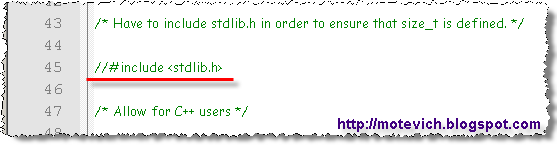
    3. Сomment out the include for stdlib.h file in:
      • C:\pcre\include\pcre.h
      • C:\pcre\include\pcreposix.h
      Commented stdlib.h file
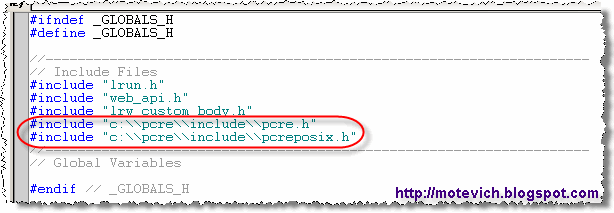
    4. In your LoadRunner script, add to globals.h:
      • #include "c:\\pcre\\include\\pcre.h"
      • #include "c:\\pcre\\include\\pcreposix.h"
      Edited globals.h file
    5. Add the match() function to vuser_init section:

      //////////////////////////////////////////////////////////////////////////
      /// 'match' function matches a 'pattern' against a given 'subject'
      /// It returns 1 for a match, or 0 for a non-match / error
      int match(const char *subject, const char *pattern)
      {
      int rc; // Returned code
      regex_t re; // Compiled regexp pattern

      lr_load_dll("c:\\pcre\\bin\\pcre3.dll");

      if (regcomp(&re, pattern, 0) != 0)
      return 0; // Report error

      rc = regexec(&re, subject, 0, NULL, 0);
      regfree(&re);

      if (rc != 0)
      return 0; // Report error
      else
      return 1;
      }

    6. Let's run sample LoadRunner script and check the result:
      As you can see, match() function works correctly. Using match() function, you can check - whether RegExp pattern matches against a text or not.

      It can be helpful, when you verify in LoadRunner that the text (RegExp pattern) matches the text on a downloaded page.

      I tested the match() function with different patterns and subject strings:
      #Subject stringPatternsResult of
      match()
      Is correct
      result?
      1abcdefb(c(.*))e1Yes
      2abcdefb(z(.*))e0Yes
      32008\\d{2,5}1Yes
      42008\\d{5}0Yes
      5abc 1st of May 2008xyz\\d.*\\d1Yes
      Note: Since LoadRunner uses ANSI C language, please do not forget to double backslashes (\\). For example, to match any digit character (0-9), use pattern "\\d".

      match() function is simple enough. But it searches only and it cannot extract matched subpatterns from the text. For example, we have to extract the name of month from these strings:
      • "abc 1st of May 2008xyz"
      • "abc 25th of February 2031"
      • etc
      We can use the following pattern:
      • \d.+([A-Z]\w+)\s+\d{4}

      The name of month will be matches by subpattern ([A-Z]\w+). How to extract the found text? You can use matchex() function for that. Let's discuss it in details...
    How to get a matched strings (RegExp patterns and subpatterns)

    To get a matched (found) strings, we have to update our match() function.
    That's why I created matchex() ('match' EXtended) function.

    1. Add the matchex() function to vuser_init section
      //////////////////////////////////////////////////////////////////////////
      /// 'matchex' (EXtended) function matches a 'pattern' against a given 'subject'
      /// It returns number of matches:
      /// 0 - for a non-match or error
      /// 1 and more - for successful matches
      int matchex(const char *subject, const char *pattern, int nmatch, regmatch_t *pmatch)
      {
      int rc; // Returned code
      regex_t re; // Compiled regexp pattern

      lr_load_dll("c:\\pcre\\bin\\pcre3.dll");

      if (regcomp(&re, pattern, 0) != 0)
      return 0; // Report error

      rc = regexec(&re, subject, nmatch, pmatch, 0);
      pcre_free(&re); // Release memory used for the compiled pattern

      if (rc < 0)
      return 0; // Report error

      // Get total number of matched patterns and subpatterns
      for (rc = 0; rc < nmatch; rc++)
      if (pmatch[rc].rm_so == -1)
      break;

      return rc;
      }

    2. Let's run sample LoadRunner script and check the result:
      matchex() function returns a number of matched patterns/subpatterns and fill an array in with information about each matched substring.


      What is an information about each matched substring?


      This info contains the offset (rm_so) to the first character of each substring and the offset (rm_eo) to the first character after the end of each substring, respectively.

      Note1: 
      The 0th element of the array relates to the entire portion of string that was matched.
      Note2: Subsequent elements of the array relate to the capturing subpatterns of the regular expression.
      Note3: Unused entries in the array have both structure members set to -1.

      Let's investigate it with the example. This is our subject string:
      ExampleThe replay log shows offsets for matched substrings:
      • Action.c(7): Matched 3 patterns
      • Action.c(10): Start offset: 1, End offset: 6
      • Action.c(10): Start offset: 2, End offset: 5
      • Action.c(10): Start offset: 3, End offset: 5

      Start offset: 1 and End offset: 6 match substring "bcdef".
      Note4: End offset is the first character after the end the current substring. That's why character "g" (with index 6) is not a part of matched string.

      As I've written in Note1, "bcdef" is the entire portion of string that was matched.
      Others items from an array relate to matched subpatterns.


      What is a subpattern in Regular Expression?
      It is a part of the RegExp pattern surrounded with parenthesis - "(" and ")".

      It's easy to get out the order of subpatterns. Just look through your pattern from left to right. When you find an open parenthes, this is a start of the current subpattern.
      Subpattern can be embedded.

      So, others captured subpatterns are:
      • Start offset: 2, End offset: 5 matches substring "cde".
        Note: current subpattern is "([acqz](.*))".
      • Start offset: 3, End offset: 5 match substring "de".
        Note: current subpattern is "(.*)".

      As you can see - this is not so difficult. :)
      Regular Expressions can be very powerful and useful in LoadRunner.
    Another example:

    Let's practise with an example I mentioned early:
    For example, we have to extract the name of month from these strings:

    • "abc 1st of May 2008xyz"
    • "abc 25th of February 2031"
    • etc
    We can use the following pattern:
    • \d.+([A-Z]\w+)\s+\d{4}
    The name of month will be matches by subpattern ([A-Z]\w+).

    Please, see LoadRunner script, which captures and prints name of months:


    Note: Pay attention that I use   arr[1] to get info about substring.

    As you remember, arr[0] contains info about the entire matched pattern, arr[1], arr[2], and so on contain info about matched subpattern.

    LoadRunner unique file name with web_save_timestamp_param function

    Earlier, I shown two ways how to create unique file names in LoadRunner:

    How to get unique file name in LoadRunner :

    Generating unique file name using LoadRunner parameter

    Today I'm going to show the simplest way. And I would like to thank Charlie for his comment.

    He suggested to use web_save_timestamp_param function.

    web_save_timestamp_param function saves the current timestamp to LoadRunner parameter. Timestamp is the number of milliseconds since midnight January 1st, 1970 (also known as Unix Epoch).

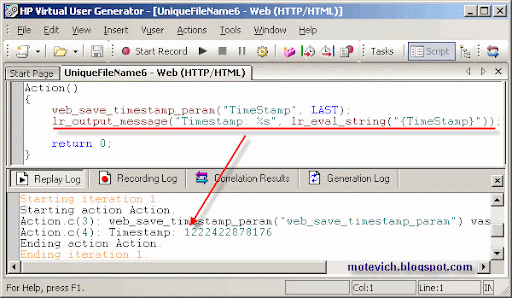
    This is how web_save_timestamp_param works:

    web_save_timestamp_param("TimeStamp", LAST);
    lr_output_message("Timestamp: %s", lr_eval_string("{TimeStamp}"));
    And the result is:
    Results in LoadRunner Generator
    As I explained in this loadRunner tutorial about unique file names in LoadRunner, we have to get unique ids per virtual users with lr_whoamiLoadRunner function.

    So, the final LoadRunner script is:
    char szFileName[256];
    int vuserid, scid;
    char *groupid;

    lr_whoami(&vuserid, &groupid, &scid); web_save_timestamp_param("TimeStamp", LAST); 

    sprintf(szFileName, "%s_%d_%d_%s",
        lr_eval_string("{TimeStamp}"), 
        vuserid,
     
        scid,
     
        groupid);


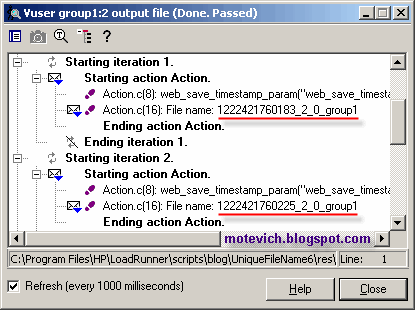
    lr_output_message("File name: %s", szFileName);
    And its result is from LoadRunner Controller:Results in LoadRunner ControllerSo, you can add a required file extension (txt, pdf, etc) and get a unique file name. It will work for any number of concurrent virtual users in LoadRunner Controller.

    All about web_url and web_link in LoadRunner

      Points to note with web_url and web_link:

      web_url is not a context sensitive function while web_link is a context sensitive function. Context sensitive functions describe your actions in terms of GUI objects (such as windows, lists, and buttons). Check HTML vs URL recording mode.
      If web_url statement occurs before a context sensitive statement like web_link, it should hit the server, otherwise your script will get error’ed out.
      While recording, if you switch between the actions, the first statement recorded in a given action will never be a context sensitive statement.
      The first argument of a web_link, web_url, web_image or in general web_* does n
    • ot affect the script replay. For example: if your web_link statements were recorded as
      Now, when you parameterize/correlate the first argument to
      On executing the above script you won’t find the actual text of the parameter {Welcome to Learn LoadRunner} instead you will find {Welcome to Learn LoadRunner} itself in the execution log. However to show the correlated/parameterized data you can uselr_eval_string to evaluate the parameter

    How Domain Knowledge is important for a tester?

    First of all I would like to introduce three dimensional testing career .There are three categories of skill that need to be judged before hiring any software tester. What are those three skill categories?
    1) Testing skill
    2) Domain knowledge
    3) Technical expertise.


    No doubt that any tester should have the basic testing skills like Manual testing and Automation testing. Tester having the common sense can even find most of the obvious bugs in the software. Then would you say that this much testing is sufficient? Would you release the product on the basis of this much testing done? Certainly not.You will certainly have a product look by the domain expert before the product goes into the market.

    While testing any application you should think like a end-user. But every human being has the limitations and one can’t be the expert in all of the three dimensions mentioned above. (If you are the experts in all of the above skills then please let me know ;-)) So you can’t assure that you can think 100% like how the end-user going to use your application. User who is going to use your application may be having a good understanding of the domain he is working on. You need to balance all these skill activities so that all product aspects will get addressed.

    Nowadays you can see the professional being hired in different companies are more domain experts than having technical skills. Current software industry is also seeing a good trend that many professional developers and domain experts are moving into software testing.

    We can observe one more reason why domain experts are most wanted! When you hire fresh engineers who are just out of college you cannot expect them to compete with the experienced professionals. Why? Because experienced professional certainly have the advantage of domain and testing experience and they have better understandings of different issues and can deliver the application better and faster.

    Here are some of the examples where you can see the distinct edge of domain knowledge: 
    1) Mobile application testing.
    2) Wireless application testing
    3) VoIP applications
    4) Protocol testing
    5) Banking applications
    6) Network testing


    How will you test such applications without knowledge of specific domain? Are you going to test the BFSI applications (Banking, Financial Services and Insurance) just for UI or functionality or security or load or stress? You should know what are the user requirements in banking, working procedures, commerce background, exposure to brokerage etc and should test application accordingly, then only you can say that your testing is enough - Here comes the need of subject-matter experts.

    Let’s take example of my current project: I am currently working on a project based on E-learning and which is a complete LMS (Learning Management System). If a tester do not have the domain knowledge or if he doesn't know what is "assessments" , "standards" and "prescription" , then how can he test that application.

    When I know the functional domain better I can better write and execute more test cases and can effectively simulate the end user actions which is distinctly a big advantage.

    Here is the big list of the required testing knowledge: 
    • Testing skill 
    • Bug hunting skill 
    • Technical skill 
    • Domain knowledge 
    • Communication skill 
    • Automation skill 
    • Some programming skill 
    • Quick grasping 
    • Ability to Work under pressure … 
    That is going to be a huge list. So you will certainly say, do I need to have these many skills? Its’ depends on you. You can stick to one skill or can be expert in one skill and have good understanding of other skills or balanced approach of all the skills. This is the competitive market and you should definitely take advantage of it. Make sure to be expert in at least one domain before making any move.

    What if you don’t have enough domain knowledge?

    You will be posted on any project and company can assign any work to you. Then what if you don’t have enough domain knowledge of that project? You need to quickly grasp as many concepts as you can. Try to understand the product as if you are the customer and what customer will do with application. Visit the customer site if possible know how they work with the product, Read online resources about the domain you want to test the application, participate in events addressing on such domain, meet the domain experts. Or either company will provide all this in-house training before assigning any domain specific task to testers.

    There is no specific stage where you need this domain knowledge. You need to apply your domain knowledge in each and every software testing life cycle.